


Falcon Private AI
Private AI that runs on your PC.
Own your machine.
Own your model.
Own your data.
- No subscription, ever
- Works offline
- Lifetime US support
Built for Traders.Working the day it arrives.
All of this runs on your machine
- Review your trade journal for patterns
- Read a broker statement back in plain English
- Write and debug your indicators
- Check a trade against your own rules
- Ask it anything else, like any assistant
Nothing goes out unless you say so. Two optional features can reach the internet: a research lookup, and checking Falcon for an updated model. Both ship switched off, behind their own toggles, and neither send your files or conversations anywhere unlesss told to.
- No subscription, ever
- Works offline
- Lifetime US support
Building trading systems
Systems sold to traders
Added monthly cost, forever
Largest capacity in the lineup
Why private AI
Once Uploaded,It's out of Your Hands.
This is the part most people have not thought through. A breach is only one of the ways your data moves. Once it sits on someone else’s servers, who gets to see it next is their call, not yours: a court order, a regulator, a contractor they hired, or the company that buys them in five years. None of that takes a hacker, and all of it has happened before.
Nobody Asks You First.
Delete won't Delete
Third-party Access
Legal process reaches data you thought was gone.
May 2025 — deleted chats ordered preserved A US federal judge directed OpenAI to preserve and segregate output log data that would otherwise have been deleted — regardless of users' deletion requests or the privacy laws OpenAI cited. It covered ChatGPT Free, Plus, Pro and Team (now Business), and API use without a zero-retention agreement.
Sept 2025 — the obligation ended, the data didn't The preservation obligation terminated effective 26 September 2025. But logs already preserved under it remain in segregated storage under legal hold, apart from a carve-out for EEA, Swiss and UK users. Ending an order does not un-collect what it collected.
January 2026 — 20 million conversations ordered produced A judge affirmed an order requiring OpenAI to hand twenty million consumer ChatGPT conversations to the plaintiffs' outside counsel — randomly sampled from Dec 2022 to Nov 2024, the vast majority unrelated to the case. They are de-identified and access is restricted by a protective order, which are real safeguards. Those users were still never parties, and nobody opted in.
S.D.N.Y. preservation order, 13 May 2025; terminated effective 26 Sept 2025 by stipulation entered 9 Oct 2025 · order affirming production, 5 January 2026. Access limited to outside counsel of record and their retained technical consultants.
The published policies say more than most people realize.
"Don't enter confidential information" Google tells Gemini users, in writing: "Please don't enter confidential information that you wouldn't want a reviewer to see or Google to use to improve our services, including machine-learning technologies." That's the vendor's own help documentation, not our characterization of it.
Reviewed chats outlive deletion Google: chats reviewed by human reviewers "are not deleted when you delete your activity" and are "retained for up to three years." Anthropic keeps inputs and outputs for up to two years — and the classification scores for up to seven — where a session is flagged as violating its usage policy.
Training is the default, not the choiceOpenAI's help center, on Free, Plus and Pro in a personal workspace: "data sharing is enabled for you by default, however, you can opt out of using the data for training." Switching it off takes about ten seconds. It's on until you do.
Google Gemini Apps privacy hub and Privacy Notice (notice updated 29 June 2026) · privacy.claude.com data-retention documentation (updated 1 July 2026) · OpenAI help center, model-training controls. Checked 15 September 2026. Business and enterprise tiers carry different defaults.
You can't audit your vendor's vendors. Neither can they.
48% of breaches involve a third party Verizon's 2026 breach report puts third-party involvement at 48%, up from 30% the year before. That's the shape of the modern incident. Separately, Black Kite's 2026 report puts the average delay to public disclosure at 117 days, median 73 — the data has moved long before you hear about it.
It already happened to an AI vendor In November 2025 an analytics provider used by OpenAI was compromised. Names, email addresses, coarse location, browser and OS, referring sites and account IDs were exposed. It reached API users and some ChatGPT users who had filed help tickets. Conversation content, credentials, API keys and payment details were not exposed — OpenAI said so plainly, which is the right way to handle it.
The supply chain is invisible to you You chose one company. You inherited every company they use, and every company those companies use — none of which appear on the page where you signed up.
Verizon Data Breach Investigations Report 2026 (published May 2026) · Black Kite Third-Party Breach Report 2026 · OpenAI incident disclosure, 26 November 2025
Your journal, your statements and your unpublished strategy are the things you can’t take back once they’re out. Falcon Private AI does not ask you to trust a policy. There is no account, no server but yours, and nothing to subpoena but you.
Running AI yourself does not make you invulnerable. A computer you own still has to be kept updated and patched. What changes is how many parties are involved: no vendor holding a copy, no contractor of theirs with access, and no record sitting somewhere else for someone to ask for. Your system arrives configured, running on your own machine, with the model’s outbound access off by default.
The lineup
Three systems, ready to roll.Pick the one that matches the capability you want.
Falcon Terminal comes installed on the Desk and the Book, with a model already loaded. With the Enclave it goes on the computer you already use. What’s left to decide is how portable you need it and how large a model you want to run.
AI memory defines how large and capable a model your machine holds.
- 12-24 GB Allocated to AI
- 12B Max Model Size
- Up to NVIDIA RTX 5090
- Intel Ultra 9 290HX Plus
Fully local
From
$4,381
- Up to 64 GB Allocated to AI
- Up to 120B Model Size
- Up to 2x NVIDIA 5090
- AMD Ryzen 9 9950X3D, Intel Ultra 7 270K Plus
Fully local
From
$6,682
- 120GB Allocated to AI
- 120B (5.1B active) Max Model Size
- Radeon™ 8060S
- AMD Ryzen™ AI Max 300 Series
Fully local
From
$6,323
AI Desk Duo and AI Book Duo
The best setups come as a Duo.
If you’re buying one of these, this is usually the answer. A Duo pairs an AI Desk or AI Book with a Falcon AI Enclave, sold together at a discount, and you get both halves of what local AI should feel like.
Your Desk or Book handles the everyday work: fast, responsive, right there in front of you. The Enclave sits alongside it holding the largest models for the heavy jobs: a full earnings transcript, a year of statements, the long reasoning you do not want to wait on a smaller model for. One toggle in Falcon Terminal picks which one answers.
Your network, stays here
everyday, instant
the big models
Away from your desk. The Enclave stays home, so off your own network you fall back to the model running on the laptop itself, still enough for the journal, the statements, and most day-to-day work. We would rather say that plainly than sell you a tunnel back to your house.
No rebuild
Your current machine stays exactly as it is
Buy once
One Enclave serves every Falcon you own
Shared
Two or three at a desk can work against one
Falcon Terminal, our software, pre-installed
Hardware is easy.
Falcon Terminal
is why you buy it.
Anyone can put an open-source AI shell on a fast PC and figure it out over the weekend. The AI Desk and the AI Book arrive with Falcon Terminal already installed, and with the AI Enclave it goes on the computer you already use. It’s software written for the work traders do. You power it on, click the tool, and hand it a file. There’s no setup, no prompt-writing to learn, and no command line to touch.
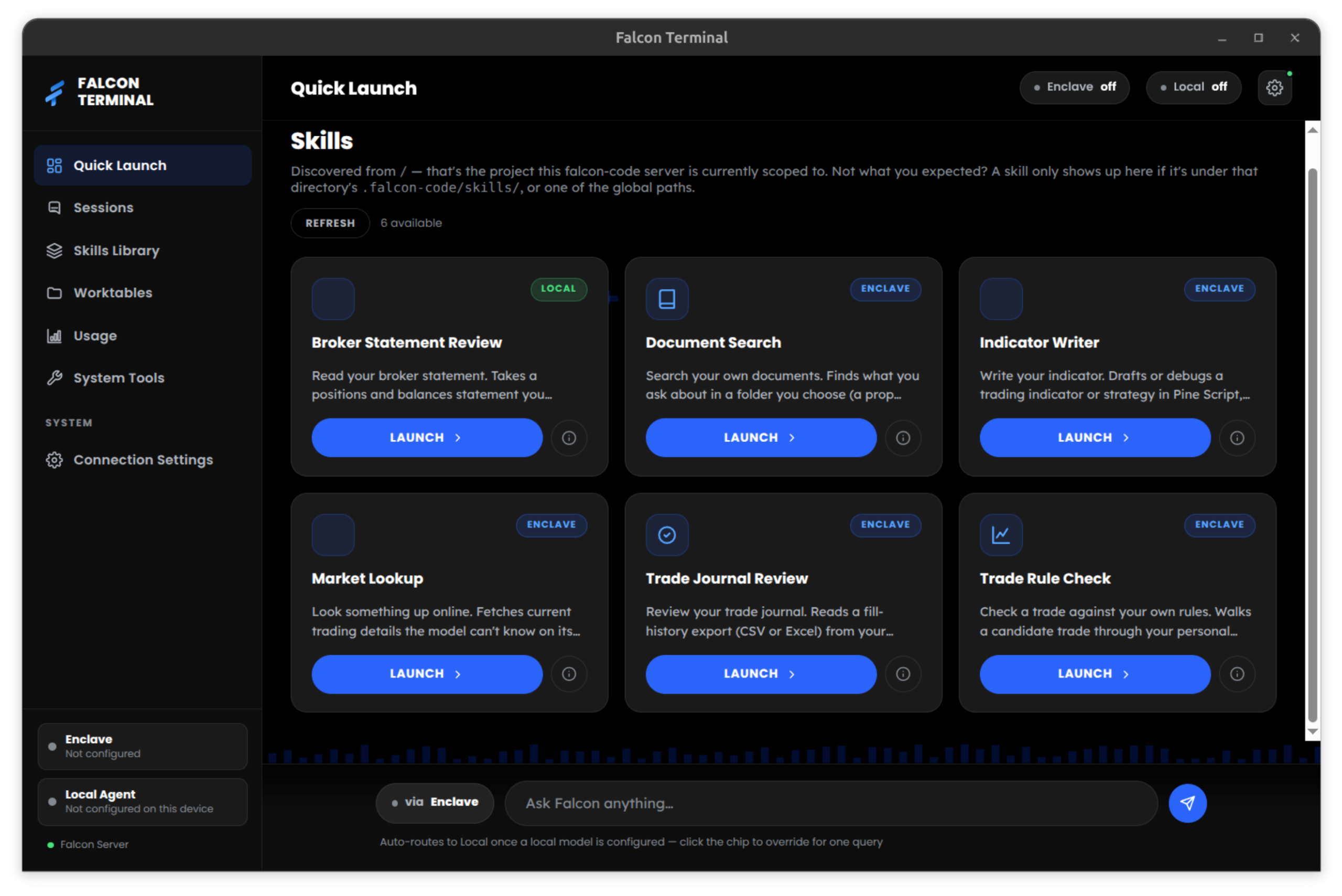
The rest of the time, it's simply your private assistant.
Everything above is built and tuned for trading. But underneath it is a full, general-purpose AI assistant, the same kind of thing you would open a browser tab for today. Draft the email, summarize the document, explain the concept, work through the problem out loud. Same window, no account, no monthly bill. Most owners end up using it for that as much as for the trading tools.
These tools help you understand your own trading: your history, your risk, your code, your statements. They will not produce buy or sell calls, and anything that could touch an order stays in simulation until you confirm it yourself, every time. It is the same line every brokerage draws, and it is the right one to draw.
Capability
What each build actually does
AI memory is the number that matters: it sets how large a model your machine can hold, and model size decides how much it knows and how carefully it reasons. Here is what each step buys you, in the work rather than the spec.
Provisional: being re-measured on the shipping software
AI Book (16")
AI Book (18")
AI Desk (base)
AI Desk (mid)
AI Desk (max)
AI Enclave
Either Duo
Falcon AI Book (16")
Quick, fluent everyday assistant. Reviews your journal, explains code and charts, handles shorter documents. Not the one to buy if you want it writing indicators from scratch.
Falcon AI Book (18")
Everything above, in a laptop. Larger documents and more careful reasoning than the entry Book, with no connection needed.
Falcon AI Desk (base)
The honest floor for AI that writes strategy code. Comfortable with full statements and long documents, and quick enough to keep up with you all day.
Falcon AI Desk (mid)
A noticeably sharper model. Better at multi-step reasoning, longer strategy code, and holding a big document in mind while you ask about it.
Falcon AI Desk (max)
Headroom for the largest models a graphics card can hold, and for keeping more than one model loaded at a time.
Falcon AI Enclave
The strongest reasoning we offer. Takes a full earnings transcript or a year of statements in one pass, and handles questions a smaller model would answer shallowly.
Either Falcon Duo
Fast local model for everything routine, the Enclave's big model when the job deserves it. One toggle decides which answers.
What "14B" or "120B" actually means.
8–14B
Quick to answer and genuinely useful. Summarizing, explaining, reviewing your journal, answering questions about a document you hand it. Occasionally shallow on hard multi-step problems.
14–32B
Where most traders should land. Drafts and debugs strategy code for you to check, and works through a statement line by line rather than skimming it.
120B-class
The Enclave’s territory. Full transcripts, dense filings, questions with several steps in them. The closest thing to a frontier model that will run on your own desk, and the slowest of the three — it trades speed for how much it can hold.
It is the size of the model, counted in billions of parameters, roughly how much it knows and how carefully it thinks. Bigger models reason better, and they need more memory to hold. That is the whole trade, and it is why AI memory is the only spec on this page we ask you to care about.
Want the full explanation: what AI memory really is, what speed means, whether local AI is genuinely free and actually private? Read the buyer’s guide to local AI →
Rent or own
Anyone can rent AI for $20 a month.That isn't what this is.
We will be straight with you: the cloud models are strong, and they are inexpensive. If all you want is a smart assistant for general questions, go subscribe to one; we do too. The reason to own a machine like this is narrower, and it only matters for a specific kind of file.
What renting means
You get the model. They get the files.
- Your files sit on their servers.
- On consumer plans, training is on by default.
- Retention outlives deletion.
- A court can ask them for it.
- The model changes when they say.
What owning means
You get the model. Nobody gets the files.
- Your files are read on your own computer.
- Nothing is training on them.
- When you delete, it’s deleted.
- You hold the only copy.
- The model changes when you say.
Business and enterprise AI plans carry different terms, and a 2025 preservation order specifically excluded them. If you are on one, several of the points above may not apply to you. On those plans your account administrator can generally read your content instead.
Go deeper
Everything else worth reading before you decide
Buyer’s guide
Local AI, explained properly
What AI memory is. What parameters mean. What speed actually measures. Whether it’s really free, and whether it’s actually private. Start here if any of this is new.
Software
Falcon Terminal
The software that comes installed on the AI Desk and AI Book, and goes on your own computer with the Enclave. Learn about the built-in tools, how the privacy toggle works, and how it works as a general assistant the rest of the time.
Hardware
See the whole lineup
AI Desk, AI Book, and the AI Enclave in full: every configuration, what each upgrade actually changes, and which one we would put you on.
Straight answers
Before you configure anything
By default, no. On the AI Desk and AI Book, Falcon Terminal and the model both run on the machine in front of you, and no connection is needed to get an answer. You can unplug the network cable and keep working. With the Enclave, Falcon Terminal runs on your computer and the model runs on the Enclave, so the question travels across your own network and no further.
Two features can reach out, and both ship switched off behind a single toggle: pulling a model update, and a research lookup. The lookup sends the question you typed to a search service. It does not send your files or your chat history. If you would rather have it enforced in hardware than trusted to software, ask us to block the AI’s network access at your network firewall.
Breaches have happened, but they’re the least interesting part of the answer. The things that move your data usually don’t involve an attacker at all: a court order, a contractor the vendor hired, a retention policy that outlives your delete button, a change of ownership, and even company policy. Those are ordinary business events, and the vendors’ own published policies often describe them. What a private system removes isn’t the chance of a break-in. It’s the fact that somebody else is holding a copy to begin with.
For a lot of what you would ask an AI, you should. It is inexpensive and it works well, and we are not going to argue otherwise.
The question is what you are comfortable sending. Explaining a butterfly spread: send it. Uploading your account statement so it can tell you where you are over-extended, or your unpublished strategy so it can debug it? Probably not, these should gives you pause. These machines are for the second category, and for the fact that you own it outright instead of renting and depending on access to someone else’s.
No, it would be silly to pretend otherwise. The frontier cloud models are ahead of anything that runs on a desk, and more accurately, they have millions of dollars worth of pooled compute.
What runs on your Falcon is capable for the work that matters: reviewing a year of trades, explaining a spread, drafting and refining an indicator, or reading a statement back to you in plain English. The case for running it centers around what you can safely hand it, your data like account statements, without thinking twice about where they end up. Most of our traders end up using both, and staying deliberate about which questions go where.
On raw infrastructure, often yes. Their buildings have security teams; yours is a computer in your office.
That is not the comparison that matters however. A datacenter protects the data it holds; it does not stop the data from being held, or in many cases given away. What owning changes is how many parties are involved: no vendor, no analytics supplier, no third-party custodian, and nobody to serve an overreaching subpoena on except you. Nearly half of all breaches now arrive through somebody’s third party, an entire category of risk that simply does not exist when the file never leaves your desk.
No. The AI Desk and AI Book arrive with Falcon Terminal installed, tuned to the machine, with a model already loaded. With the Enclave, Falcon Terminal installs on the computer you already use, one download, because the hard part is already done on the box. There’s no command line, no account to create, and nothing to configure. You open the tool and hand it a file.
The Enclave is the clean answer: it’s a separate machine, so the AI work never touches your trading computer. Nothing is shared, and there’s nothing to balance. That’s the whole reason it exists.
On the AI Desk, up to three monitors run off the processor’s built-in graphics while the AI runs on the graphics card, so the chip doing AI work isn’t the one drawing your charts. Past three, the card starts driving displays too, and the two jobs share it. A heavy AI request during a busy session can show up in your charts.
The AI Book has one GPU doing both jobs from the start. A large AI request while a full chart layout is running can show up as a slower chart.
If you run a big wall and you want the AI working hard at the same time, pair whichever machine you have with an Enclave.
You load it, if you want it. New models come out constantly and they run on the same hardware; we evaluate the ones worth caring about against the work traders actually do, and release the ones that earn it for your machine.
Nothing installs itself and nothing changes underneath you, which is the opposite of the cloud problem, where the vendor can retire the model you had gotten used to, or change how it works on even a daily basis, with or without notice. These changes can affect your work or results overnight.
Not sure which one you need?
Tell us what you want the AI to do (review your journal, write your indicators, read your statements) and we will tell you the smallest machine that does it well. That is a real conversation with a technician, not a form.